All docs pages
The Commander Tab
Commander is the single-verdict console. It answers one question at a glance — who is in control, bulls or bears, and how convinced the console is — then shows you where that read can flip.
- The hero Control Strip reads BULLS IN CONTROL, BEARS IN CONTROL, or CONTESTED, with a conviction number and the top driver behind it.
- Three pillar chips — ENGINE, FLOW, STRUCT — show whether the structural read, live order flow, and chart structure agree. Agreement is conviction; disagreement is caution.
- The VIX1D gate reads ✓ CLEAR, ⚠︎ CAUTION, or ⛔ VETO — same-day volatility drives the timing read while 30-day VIX remains context.
- The REVERSAL radar scores 0–100 how hard the other side is pushing, and flags UPSIDE TURN RISK or DOWNSIDE TURN RISK.
- Type a symbol (SPX, SPY, QQQ) and press Load to point Commander at it.
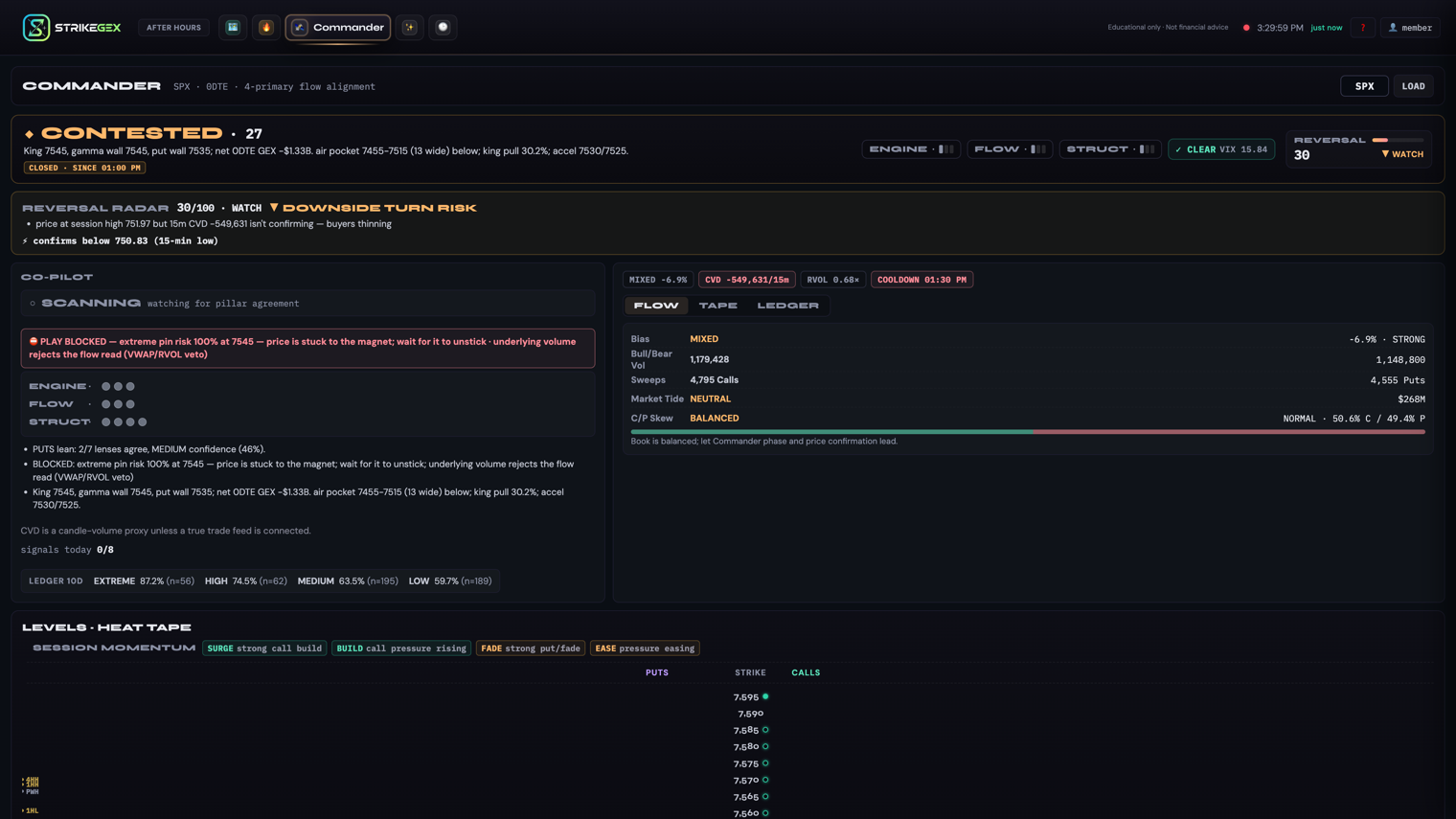
Everything on this page is educational context for your own read of the tape — not financial advice.
The Control Strip
The top of Commander is the hero: a single verdict, big and unambiguous. It resolves to one of three states.
- BULLS IN CONTROL (▲) — the console reads the side pressing higher as in charge.
- BEARS IN CONTROL (▼) — the side pressing lower is in charge.
- CONTESTED (◆) — neither side has a clear grip. Read this as a two-way tape, not a signal to force a side.
Next to the verdict sits a conviction number — confluence scaled by pillar agreement and capped by the short-vol gate. It ranks evidence agreement; it is not a win probability. Below the verdict, the top driver is a one-line, plain-English reason for the current read. Read the strip top to bottom: verdict, then how convinced, then why.
The three pillars: ENGINE, FLOW, STRUCT
Under the verdict, three chips break the read into the pieces it is built from. Each shows a direction glyph (▲ up, ▼ down) and a small strength meter. Grounded in their in-app tooltips, they are:
| Pillar | What it reads |
|---|---|
| ENGINE | The structural read — the app's dealer-gamma level structure, distilled to a direction and strength. |
| FLOW | Live order-flow alignment — whether today's order flow is pulling with the verdict or against it. |
| STRUCT | Chart structure — the price-structure read (trend and levels) from the chart itself. |
The pillars are how the verdict earns its conviction. When all three point the same way, you have agreement and a stronger read. When one dissents, that is caution — the console is telling you the sides of the case don't fully line up.
The short-vol gate: CLEAR, CAUTION, VETO
To the right of the pillars, the chip prefers VIX1D and its change from the prior close because that horizon matches 0DTE. The 30-day VIX remains regime context rather than a same-day directional trigger. The gate reads one of three states.
- ✓ CLEAR — the volatility gate is open.
- ⚠︎ CAUTION — conditions are marginal; the gate flags it and often carries a short reason.
- ⛔ VETO — conditions are hostile enough that the gate holds plays back.
The gate is a guardrail, not a forecast. Think of it as the console refusing to hand you a play the environment doesn't support.
The Reversal Radar
The REVERSAL strip scores, 0–100, how hard the other side is pushing against the current verdict. A higher number means more counter-pressure. It bands into four states, and where it matters it also names a direction.
| State | What it means |
|---|---|
| CALM | Little counter-pressure. The current read isn't being fought. |
| WATCH | The other side is starting to push. Keep an eye on it. |
| WARNING | Meaningful counter-pressure. The verdict is under real strain. |
| CRITICAL | The other side is pushing hard. The read is most exposed to a turn here. |
From WATCH up, the radar also flags a direction: ▲ UPSIDE TURN RISK (risk of a turn up) or ▼ DOWNSIDE TURN RISK (risk of a turn down). Read the pair together: the verdict says who is in control now; the radar says how hard the other side is leaning to take it back.
Loading a symbol
Commander runs on one symbol at a time. Use the toolbar at the top of the tab.
- Type a symbol into the input (SPX, SPY, or QQQ).
- Press Load.
The console repoints and every strip above updates for the new symbol.
Chip glossary
As you scan Commander you'll meet a handful of small chips. These are the tooltip-level meanings — one line each, so a new reader isn't stuck decoding them.
| Chip | What it means |
|---|---|
| LEDGER 10D | A hit-rate readout of directional reads over the last 10 sessions, so you can see how the recent reads have landed. |
| PULSE ▲ … ACCEL | The 60-second tape is accelerating — a burst of one-sided order flow (▲ call-led, ▼ put-led) right now. |
| COILED ▲ / COILED ▼ | Price is compressing into a tight, one-sided range — coiled, and leaning up (▲) or down (▼). |
| CVD session | Cumulative volume delta — running net of buying vs. selling volume through the session. A tick chip; up is net buying, down is net selling. |
Status states
When the tape isn't live, the strips carry a badge instead of a fresh read.
- CLOSED · since <time> — the market is closed; the read is the last one from the prior session.
- DATA DELAYED · <time> — the feed is behind; the timestamp shows how current the read actually is.
Treat either badge as a reason to confirm before acting — the console is telling you it isn't reading live.
Common questions
- The verdict says BULLS but a pillar points down — is that a bug?
- No. The pillars are independent votes, and a dissenting one is the point: it lowers conviction and shows you exactly where the read is soft. A unanimous three is a stronger read than a split two-to-one.
- What's the difference between CONTESTED and low conviction?
- CONTESTED is a verdict — neither side has a clear grip. Low conviction is a strength reading that can sit under any verdict, including a directional one, telling you that read is thin.
- The Reversal Radar disagrees with the verdict. Which do I trust?
- They aren't competing. The verdict is who holds the tape now; the radar is how hard the other side is pushing to take it. A strong verdict with a high radar is a coherent "in control, but pressure building" state.
- I'm on Pro but don't see the Commander tab.
- Load it directly by adding /commander to the URL. The tab button is hidden by default on some views; the console itself is the same.