All docs pages
Data Freshness & Status Banners
StrikeGEX tells you exactly how fresh every number on screen is. This page collects every staleness chip, banner, and empty state in one place — so you always know whether you're looking at a live read or a snapshot.
- The golden rule: the app never silently serves old data. If nothing on screen says stale, the read is live.
- The top bar's status dot reads Live · <time> when data is flowing, and the view refreshes on its own.
- A Data delayed banner during the session means the feed is behind — treat levels as a snapshot until it clears.
- An As of <time> · market closed banner is normal off-hours: you're viewing the last session's structure.
- When live order flow is unavailable, the app falls back to open-interest gamma and says so — it never hides the downgrade.
- Educational only — these readouts describe structure and freshness, not financial advice.
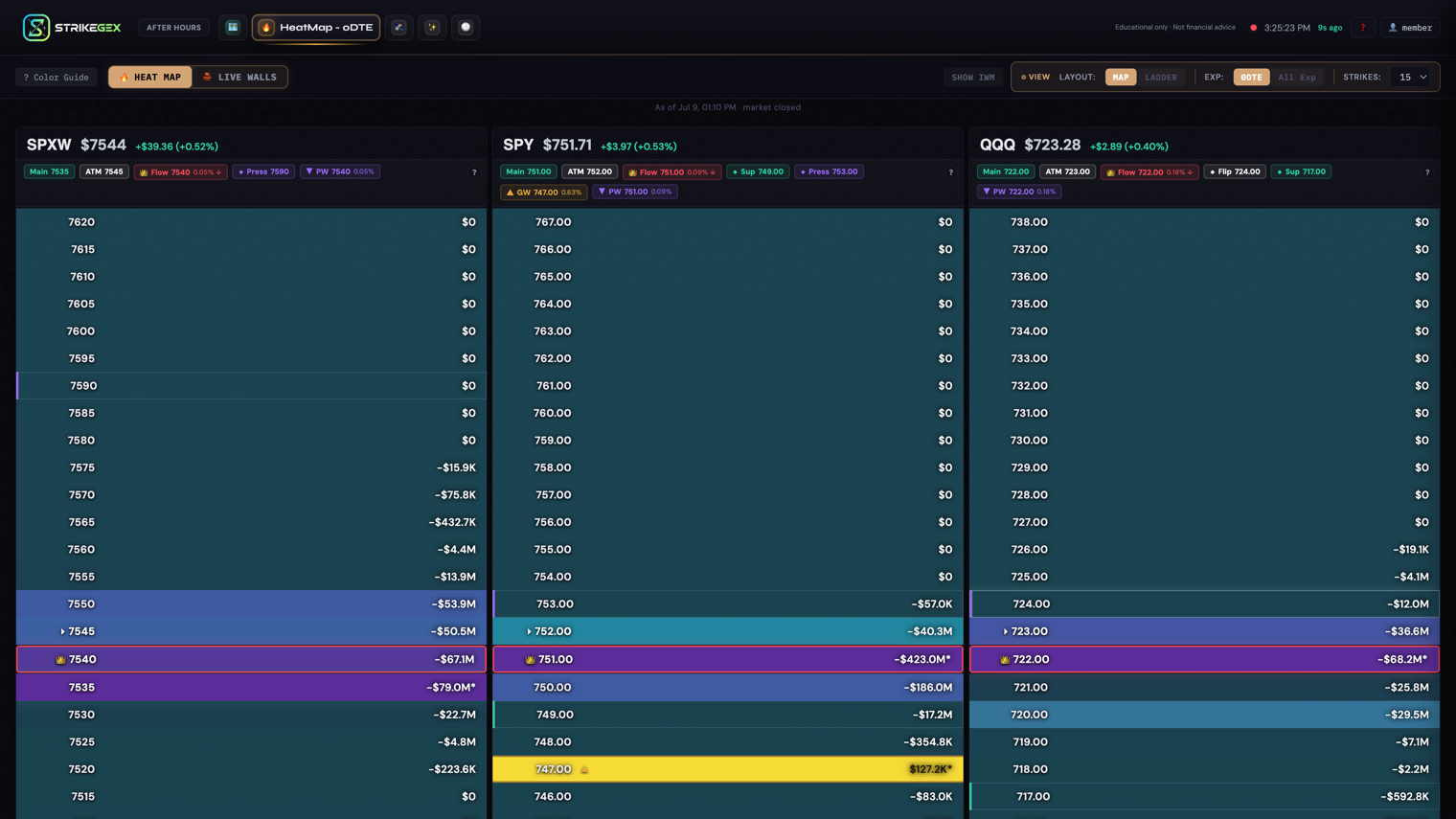
Every mechanism below answers the same three questions: what the signal looks like, what it means, and what to do. Read the table first, then jump to any row that needs unpacking.
Every freshness signal, at a glance
| Signal | Where it appears | What it means & what to do |
|---|---|---|
| Live · <time> | Top bar status dot | Data is current and auto-refreshing. Nothing to do — this is the healthy state. |
| Data delayed | Top bar banner (during market hours) | The feed fell behind. Levels are a snapshot from the last-update time shown. It refreshes automatically — wait for the banner to clear before leaning on the numbers. |
| As of <time> · market closed | Top bar banner (off-hours) | You're viewing the last session's structure. Normal outside trading hours. |
| DATA DELAYED · <time> / CLOSED · since <time> | Commander control strip | Commander's read is behind or from the prior session. Confirm before acting. |
| GEX-ONLY | Commander control strip | Live flow, tape, and skew are withheld; you get GEX levels only. The co-pilot withholds plays until full data returns. |
| Live-flow fallback banner | HeatMap | Live order flow is unavailable; the map is showing open-interest gamma only. Live Flow goes dark; Dealer Positioning is still valid. |
| Awaiting live flow | HeatMap (Live Flow) | Live Flow has no order flow to read yet — usually before the open. Switch to Dealer Positioning, which has data. |
| LIVE / STALE | Wall Panels toolbar | Whether the ladder is updating. On STALE, trust the timestamp over the badges. |
| Post-OPEX Window | Top-of-page banner | Monthly expiration reset the gamma structure. Be patient with fresh levels while they rebuild. |
The top bar: your primary freshness read
The status dot in the top bar is the fastest way to know what you're looking at. When data is flowing it shows a live dot and reads Live · <time>, and the view refreshes on its own — you don't need to reload.
When the feed falls behind during the session, a banner appears: ⚠ Data delayed — last update <time> ET. Refreshing automatically. The dot stops reading "Live." That's your cue to treat the on-screen levels as a snapshot from the time shown, not a live read. The app keeps trying to catch up, so let the banner clear before you act on the numbers.
Outside trading hours the same top-bar slot reads As of <time> · market closed. This is not a warning — it's the app being honest that you're viewing the last completed session's structure. A screenshot you take off-hours will never look more current than it actually is.
Commander: DATA DELAYED, CLOSED, and GEX-ONLY
Commander carries its own freshness badges on the control strip so the verdict never looks fresher than its inputs. Two of them mirror the top bar:
- DATA DELAYED · <time> — the feed is behind; the timestamp shows how current the read actually is.
- CLOSED · since <time> — the market is closed; the read is the last one from the prior session.
The third badge is Commander-specific. GEX-ONLY means the live-flow lens is unavailable — flow, tape, and skew are withheld, and Commander leans on dealer-gamma (the GEX levels) plus price alone. Its co-pilot is deliberately conservative here: instead of surfacing a trade, it withholds the play and tells you why, reading something like "Play withheld — flow lens dark; read-only until full data returns." Treat a GEX-ONLY Commander as a levels map, not a signal.
HeatMap: live-flow fallback and "Awaiting live flow"
The HeatMap has two signals. Live Flow estimates dealer exposure from today’s options trades. Dealer Positioning estimates dealer exposure from open interest — the standing structure built up over time. Freshness affects them differently.
Live-flow fallback. If our live options feed goes offline mid-session, a banner appears on the map: ⚠ Live flow unavailable — showing open-interest gamma only. Live Flow has nothing to read and goes dark, but Dealer Positioning is unaffected — estimated dealer positioning is still valid structure. Switch to DEALER POSITIONING and keep trading the levels.
After the close. At the 4:15 PM ET options close, the 0DTE board rolls to the next session's contracts. From then on, Live Flow shows the trades made today in those contracts, weighted by their gamma. It's a real read of positioning taken into the next session, not live flow from that session.
Awaiting live flow. When the session's contracts have no order flow to read yet, usually before the open, the map shows Awaiting live flow with the note Live Flow needs live order flow. This is an empty state, not a broken feed. Dealer Positioning still has structure — take the one-click switch to DEALER POSITIONING.
Wall Panels: LIVE and STALE
Each Wall Panel ladder carries its own freshness chip in the toolbar. A LIVE chip followed by a timestamp (for example LIVE · 10:42:17) means the ladder is updating on the roughly 60-second snapshot cadence. If the feed goes cold the chip switches to STALE. When it does, trust the timestamp over the badges — a strengthening-wall badge means nothing if the underlying read hasn't refreshed.
Post-OPEX: a structure reset, not a staleness bug
After monthly options expiration (OPEX), a banner reads Post-OPEX Window. Monthly options expiration resets gamma structure. GEX levels may shift significantly as new positions establish. Use caution with level-based entries.
This isn't about stale data — the read is live. It's about the levels themselves being freshly rebuilt. When a large block of options expires, the gamma structure that shaped the prior sessions clears out, and new positioning takes several sessions to settle. While the banner shows, expect levels to move more than usual and be more patient before trusting a fresh level to hold.
The golden rule
StrikeGEX never silently serves stale data. Every downgrade — a delayed feed, a closed market, a missing live-flow lens, an unrefreshed ladder — surfaces its own banner, chip, or empty state. So the rule is simple: if nothing on screen says stale, the data is live. You don't have to hunt for a hidden problem; the app tells you.
Common questions
- The banner says "Data delayed." Do I need to reload?
- No — the app refreshes on its own and the banner clears when the feed catches up. Delayed means the numbers are a snapshot from the last-update time shown, so just wait for "Live" to return before you lean on them.
- Commander won't give me a play and shows GEX-ONLY. Is it broken?
- No. GEX-ONLY means the live-flow lens is temporarily unavailable, so Commander deliberately withholds the trade rather than acting on partial data. You still get the dealer-gamma levels — read them as a map, and confirm elsewhere before acting.
- Live Flow is empty but Dealer Positioning looks fine. Which do I trust?
- Dealer Positioning. When Live Flow shows Awaiting live flow or the fallback banner, live order flow isn't available — but Dealer Positioning's dealer open-interest structure doesn't depend on it and stays valid. Switch to DEALER POSITIONING.
- Why do the levels look different right after monthly expiration?
- Because OPEX clears out expiring positions and the gamma structure rebuilds over the following sessions. The Post-OPEX Window banner is your reminder to be more patient with fresh levels until the new structure settles.